◈ DATA INSIGHTS
EconomyDeep diveTrending
Exploring India's Economic Landscape
Uncovering insights through data
140Rent index
115Pay index
125Food index
Illustrative classroom data · 2020–2025 · index, 2020 = 100
Intro to Computational Journalism · Session 10
How to make your data stories look like journalism, not a template
0.5 min · Slide 1 / 23
Teaching point: Design judgment remains the journalist’s job.
Demonstrate: Connect to Session 9: students have a working HTML/CSS story; today they will edit the reader’s experience. Keep reporting and analysis their own.
01 · Recognising the AI aesthetic
1 min · Slide 2 / 23
Teaching point: Recognise recurring defaults without claiming authorship from appearance.
Demonstrate: Ask for patterns students have noticed. Appearance cannot prove a page was made with AI. “AI aesthetic” is shorthand for familiar defaults, not a detection method.
Ask: What do you see repeatedly?
Uncovering insights through data
Illustrative classroom data · 2020–2025 · index, 2020 = 100
Where does your eye go first? What is the finding?
2 min · Slide 3 / 23
Teaching point: A page can be functional while giving the reader no clear priority.
Demonstrate: Let students look silently for 15 seconds, then name the headline, cards, badges, icons, gradient and shadows. All data on this mock page are invented.
Ask: Which element is asking for your attention?
Uncovering insights through data
4Illustrative classroom data · 2020–2025 · index, 2020 = 100
2 min · Slide 4 / 23
Teaching point: Critique a design decision by its effect on understanding.
Demonstrate: Use the reveal button to discuss one problem at a time. Ask what to remove before suggesting more styling. The chart is not false; the page makes it hard to find a point.
Ask: Which decision would you change first?
A · Defaults
Uncovering insights through data
Illustrative classroom data · 2020–2025 · index, 2020 = 100
B · Editorial decisions
Rent climbs 40% in five years. Pay increases 15%.
By Classroom Reporter · Fictional example
3 min · Slide 5 / 23
Teaching point: Hold evidence constant while comparing design.
Demonstrate: Ask for a five-second reading of each. The edited headline is a restatement of the displayed figures; it adds no reporting. Note that both charts use the same scale and six annual values.
Ask: What can you explain from B that took longer in A?
Any style can work when it serves the subject and the reader.
1.5 min · Slide 6 / 23
Teaching point: No particular visual style is inherently bad.
Demonstrate: Point to the dark Reuters illustration later in the deck: it provides spatial context. Ask students to defend a card or gradient with a concrete reader need.
Ask: What would be a useful editorial reason for using a dark background?
0.75 min · Slide 7 / 23
Teaching point: Use these as a critique framework, not a style checklist.
Demonstrate: Introduce the five lenses quickly. Each rule should answer: how does this help the reader understand the reporting?
Equal emphasis
Rent climbs 40% in five years. Pay increases 15%.
By Classroom Reporter · Fictional data · 2020–2025
A clear reading order
Rent climbs 40% in five years. Pay increases 15%.
By Classroom Reporter · Fictional data · 2020–2025
2 min · Slide 8 / 23
Teaching point: Hierarchy establishes the reader’s entry point.
Demonstrate: Ask one student to read each version aloud in the order their eyes choose. Show that type size, weight and whitespace can establish order without adding a box.
Ask: What should be first, second and third?
Decoration carries the emphasis
Discover the numbers behind the story.
Illustrative index · 2025 · 2020 = 100
Space carries the emphasis
Illustrative index · 2025 · 2020 = 100
Whitespace separates ideas. It is not wasted space.
2 min · Slide 9 / 23
Teaching point: Remove elements that do not encode meaning or support navigation.
Demonstrate: Compare the exact same three values. Explain that a card is useful when it groups something meaningful; shadows and badges should not be automatic.
Ask: Which removed element do you actually miss?
No consistent roles
A rent index describes change over time, not the monthly amount paid. In this invented series, rent rises from 100 to 140 while pay reaches 115. The gap is the finding; the index definition keeps it honest.
WHAT DOES IT ALL MEAN?
Rent and pay move at different rates.
A repeatable system
A rent index describes change over time, not the monthly amount paid. In this invented series, rent rises from 100 to 140 while pay reaches 115. The gap is the finding; the index definition keeps it honest.
Choose roles, then repeat them. Font pairing is optional; clear hierarchy is essential.
3 min · Slide 10 / 23
Teaching point: Typography is a system of roles and reading comfort.
Demonstrate: Read a line in the cramped version. Point to line length, line height and contrast between headline and body in the edited version. Two families are an example, not a rule; one family can work. The exact size must be checked on the actual device.
Ask: Which paragraph would you choose to read for five minutes?
A chart dropped into a page
Source: data
A chart that supports a finding
Illustrative index · 2020 = 100
Source: invented classroom series, 2020–2025.
Rent +40%; pay +15%. See all values.
3 min · Slide 11 / 23
Teaching point: The chart needs a takeaway, clear encoding and enough context to verify it.
Demonstrate: Identify direct labels, a single highlighted series, the annotation, units, period and source. Do not silently alter scales or drop inconvenient evidence when redesigning.
Ask: What does “140” mean here? What does it not mean?
No rhythm
A rent index describes change over time, not the monthly amount paid. In this invented series, rent rises from 100 to 140 while pay reaches 115. The gap is the finding; the index definition keeps it honest.
The rent index reaches 140; pay reaches 115.
Illustrative data · 2020–2025
Claim → evidence → explanation
A rent index describes change over time, not the monthly amount paid.
The index shows rent growing faster. It does not tell us who can afford a home.
Illustrative data · 2020–2025
Comfortable column width. A chart with room. A clear section break.
2.25 min · Slide 12 / 23
Teaching point: A story has a reading sequence, not a collection of containers.
Demonstrate: Walk down each column. Explain how a narrow chart can become unreadable even if the page is technically responsive. The after version shows an excerpt to demonstrate pacing, not an instruction to delete reporting.
Ask: Where would you put the chart if it supports the first finding?
Desktop · one story
Rent climbs 40%; pay increases 15%.
Illustrative index · 2020–2025 · 2020 = 100
Mobile · same story
Rent climbs 40%; pay increases 15%.
Illustrative index · 2020–2025 · 2020 = 100
Source and method ↗2 min · Slide 13 / 23
Teaching point: A narrow screen changes layout and interaction, not the reporting.
Demonstrate: Use the slide 19 Mobile button for a true 375px webpage. These two mock frames are schematic comparisons. Check body text at natural size, chart labels, overflow and a roughly 44px target for touch controls.
Ask: Which desktop decision stops working on a phone?
03 · Real examples · 10 minutes
1 min · Slide 14 / 23
Teaching point: Study editorial choices, not a publication’s surface style.
Demonstrate: Ask students to borrow a decision, not a font or a full layout. Each following slide has an authentic image and a link to the original.
Ask: What should we look for beyond whether we like the design?
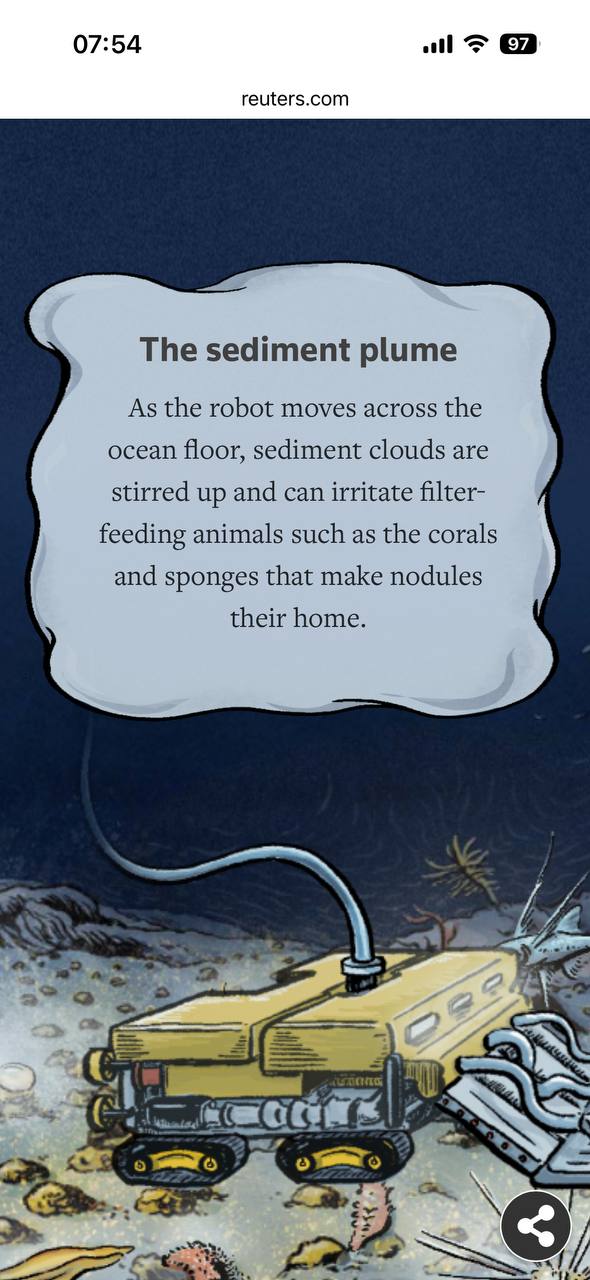
A named process gives the reader a way in.
Text sits beside the thing it explains.
The dark ocean scene explains location.
3 min · Slide 15 / 23
Teaching point: A dark palette and illustration can have a clear editorial reason.
Demonstrate: Open the story if time allows. Scroll from the opening question to the seabed explanation. Discuss the screenshot as an annotation example; do not teach its 2023 industry status as current news.
Ask: What would be lost if this text were only in a distant caption?
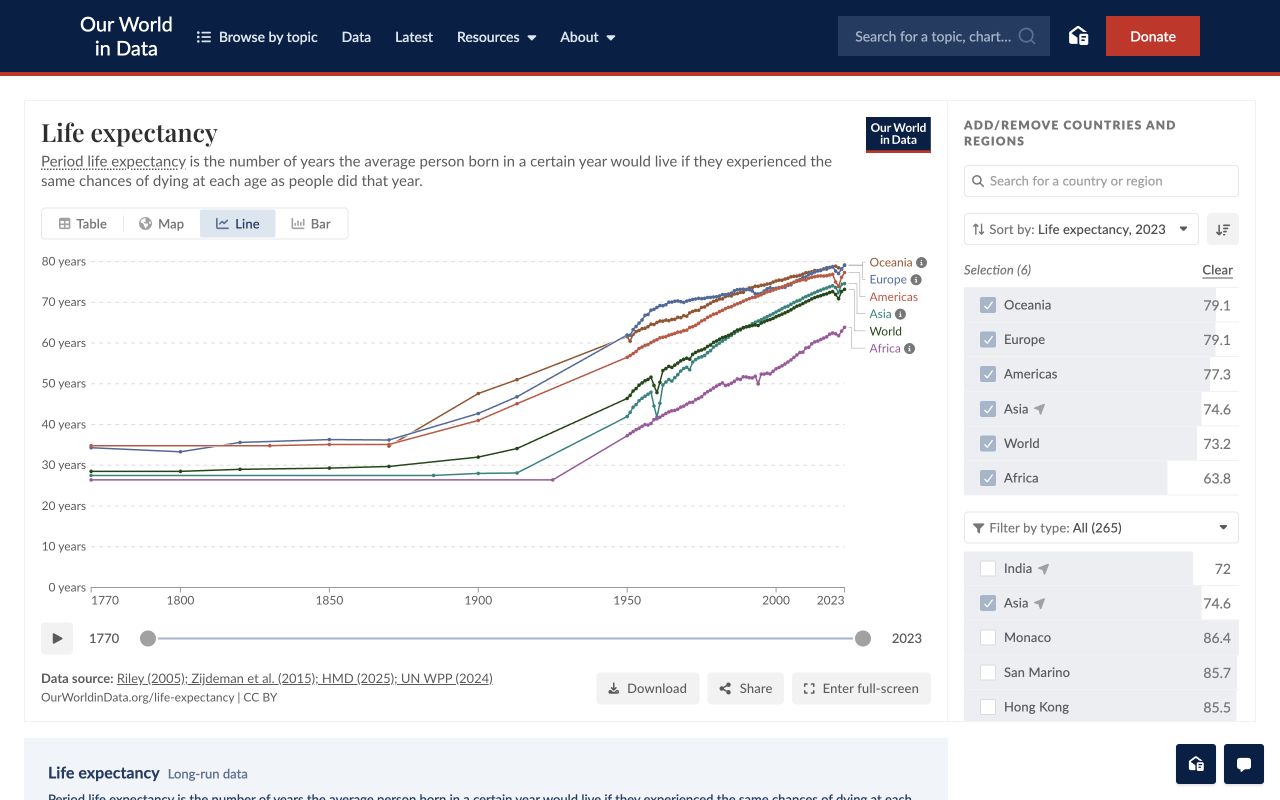
Regions are named at the line ends.
Years on the axis; dates on the timeline.
Named sources and downloadable data.
3 min · Slide 16 / 23
Teaching point: Context and provenance are part of the visual, not afterthoughts.
Demonstrate: Open the chart and point to years, period, direct labels, source line and download options. Ask what life expectancy measures rather than inferring a new finding. The screenshot preserves the chart state at capture.
Ask: Can you find the unit and the original data providers?
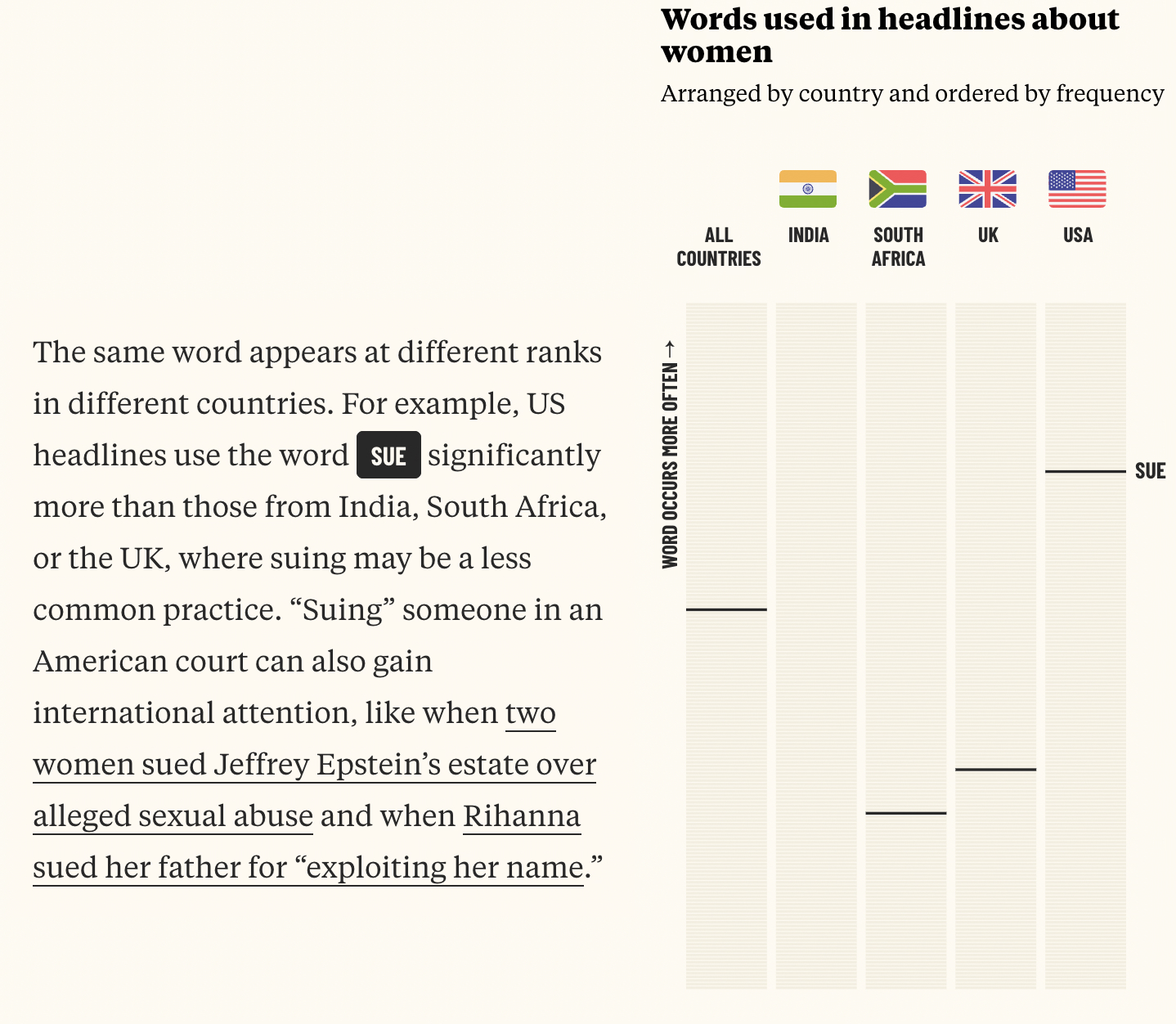
Words become the visual material.
The prose cues a word to inspect.
The form is specific to this story.
3 min · Slide 17 / 23
Teaching point: Editorial restraint does not require visual sameness.
Demonstrate: Open the original and scroll through a word comparison. Discuss how prose and visual emphasis work together. Distinguish frequency from the more interpretive bias measures later in the piece; those are not today’s lesson.
Ask: Would this design make equal sense for a story about bus times?
2 min · Slide 18 / 23
Teaching point: Diagnose before prompting or changing code.
Demonstrate: Ask students to identify the lead, the strongest chart and a reading-width problem. This is constructed work, not a student submission. The frame scrolls like a real page; arrow keys inside it scroll the example.
Ask: Which change would improve understanding most?
Before · Same illustrative figures, chart, source and reporting in both versions.
6 min · Slide 19 / 23
Teaching point: A design edit must preserve the evidence and the meaning of the reporting.
Demonstrate: Spend one minute diagnosing and four minutes toggling and explaining edits. Both pages use the identical chart SVG, reporting paragraph, limitations, source and data link. Only headline wording, hierarchy and CSS change. Toggle Mobile and show that the before page overflows while the after page reflows. On an actual phone the available frame is narrower than 375px; open the full page to inspect it. Finish by checking the numbers and caveat.
Ask: What changed in the reader’s path? What evidence stayed the same?
Vague
“Make my website look professional.”
“Review my data-story webpage as an editorial designer. Identify five specific problems with hierarchy, typography, spacing and chart presentation. Keep all reporting, numbers, charts and sources unchanged. Explain your proposed changes before editing the HTML and CSS. Avoid unnecessary decorative UI.”
2 min · Slide 20 / 23
Teaching point: The journalist sets constraints and approves changes; AI can implement them.
Demonstrate: Read the better prompt. Remind students that reporting, analysis and story writing remain theirs. If a headline needs rewriting, the student writes or approves it; the tool must not invent a conclusion.
Ask: Which phrase stops an attractive redesign from changing your evidence?
10 min · Slide 21 / 23
Teaching point: Apply judgment to the student’s own work.
Demonstrate: Set a ten-minute timer. At two minutes, ask students to stop diagnosing and start implementing. At eight minutes, prompt the mobile and evidence check. If time is tight, fix one high-impact problem rather than changing the whole page.
Ask: What is the specific reader problem you are solving?
“The reader couldn’t ___ .
I changed ___ so they could ___ .”
Evaluate clarity: can we find the main point faster? Can we still check the evidence?
3 min · Slide 22 / 23
Teaching point: Critique a change by its effect, not visual impressiveness.
Demonstrate: Invite two students for about 75 seconds each, with 30 seconds for transition; or three at 50 seconds each. Ask the class for one observation about clarity rather than a beauty vote.
Ask: What can you understand now that you couldn’t understand before?
Good editorial design makes a storyeasier to understand, and harder to misunderstand.
1 min · Slide 23 / 23
Teaching point: Design decisions are editorial decisions.
Demonstrate: Return to the central thesis. Ask students to carry one intentional choice into their next project. Finish at minute 60.